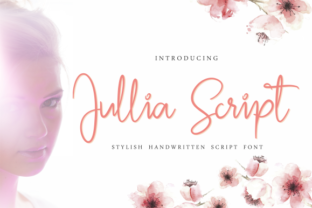
Jullia Script: A Handwritten Font for Creative Branding
I was working on a branding project for a new boutique café, and I needed something that felt warm and inviting. The client wanted their brand to scream “homemade” and “community,” so I knew the typography had to match that vibe. That’s when I first tested Jullia Script. From the moment I saw it, I knew this was the font that could bring the brand to life.
What Makes Jullia Script Stand Out
Jullia Script is a handwritten script font with a soft, flowing character. It has a natural, organic feel—like someone actually wrote it by hand. The curves are smooth, and the letters have subtle variations in thickness, which gives them a human touch. This makes it perfect for logos, name tags, and anything that needs to feel personal and authentic.
As a designer, I love how it balances elegance with approachability. It doesn’t feel too formal or too casual, making it versatile for different kinds of creative projects. Whether you're designing a wedding invitation or a product label, Jullia Script adds a unique personality that stands out without overwhelming the design.
Testing Jullia Script in Real Projects
I started by placing Jullia Script on the logo mockup. The café's name was short and simple, which made it ideal for a script font. The result was beautiful—clean, readable, and full of character. I used it as the main typeface for the logo and paired it with a clean sans serif font for the supporting text. The contrast worked well, creating a balanced visual hierarchy.
Next, I tested it on packaging mockups. The font looked great on coffee bags, menu cards, and even stickers. It added a sense of warmth and craftsmanship, which perfectly matched the café's identity. I also used it on social media graphics and Instagram posts. The font didn’t lose its charm on digital platforms, and it helped maintain consistency across all brand materials.
Where Jullia Script Shines
Jullia Script works best as a display font or headline font. It can be used for logos, taglines, headings, and accents in editorial design. However, I wouldn’t recommend using it for long-form text due to its cursive nature. It’s more suitable for short phrases and names where readability is still maintained.
For example, I used it on a shop sign, business cards, and even a label sticker for the café’s signature drink. Each time, it brought a sense of authenticity and charm to the design. It also looked great on a homepage hero section, where it served as the main heading. The font helped create a welcoming atmosphere that aligned with the brand’s vision.
Design Tips When Using Jullia Script
If you’re considering using Jullia Script for your project, I recommend testing it early in the design process. Start with a few mockups and see how it looks in different contexts. Pay attention to how it pairs with other fonts. In my case, I used a modern sans serif font for body text, which created a nice balance between the handwritten script and the clean, professional look of the rest of the design.
Also, check if the font includes alternate characters, ligatures, or different weights. These features can add more depth to your designs and help you achieve a more customized look. Make sure the font supports the languages you need and that you have the right commercial license if you're using it for client work.
When it comes to file formats, I found that the font worked well in both print and digital formats. It’s important to test it across different platforms to ensure it maintains its quality and appearance everywhere it’s used.
Practical Advice for Client Work
For client projects, I always suggest starting with a small test before committing to a full brand system. Show them how the font looks in different applications—logos, packaging, social media, and website headers. This helps them visualize the overall brand identity and ensures they’re comfortable with the direction.
It’s also worth discussing font pairing. Jullia Script works well with both serif and sans serif fonts, but I’ve found that pairing it with a modern sans serif font creates the most visually appealing results. This combination keeps the design clean while adding a personal touch through the script font.
Whether you're designing for a small business, a creative studio, or a product-based brand, Jullia Script can be a valuable asset in your toolkit. Its versatility, readability, and unique character make it a great choice for any project that needs a personal and elegant touch.